I ran an SSH Honeypot for 3 months - Here is what attacked it
So, I did a thing. As you probably already know from my other blog entry on how to setup an SSH honeypot, I've been running SSHesame to see what the internet throws at an exposed SSH server. I left it running for about three months across two servers, just to see what would happen (If you're unfamiliar, a honeypot is a fake server designed to let attackers 'succeed' so we can study their behavior).
The Numbers Game
Let's start with the headline stats (combined from both servers):
- 103.137 connections from random IPs
- 188.737 authentication attempts
- ~300.000 commands executed
That's roughly 1.100 connections per day, every day, for three months. And these are just two servers with no services advertised anywhere. The internet is a noisy, noisy place. To make sense of all this data, I wrote a custom Python script that parses the SSHesame logs and generates the statistics report you'll see throughout this post. If you want to run your own analysis, you can grab it from GitHub.
When Do Attackers attack
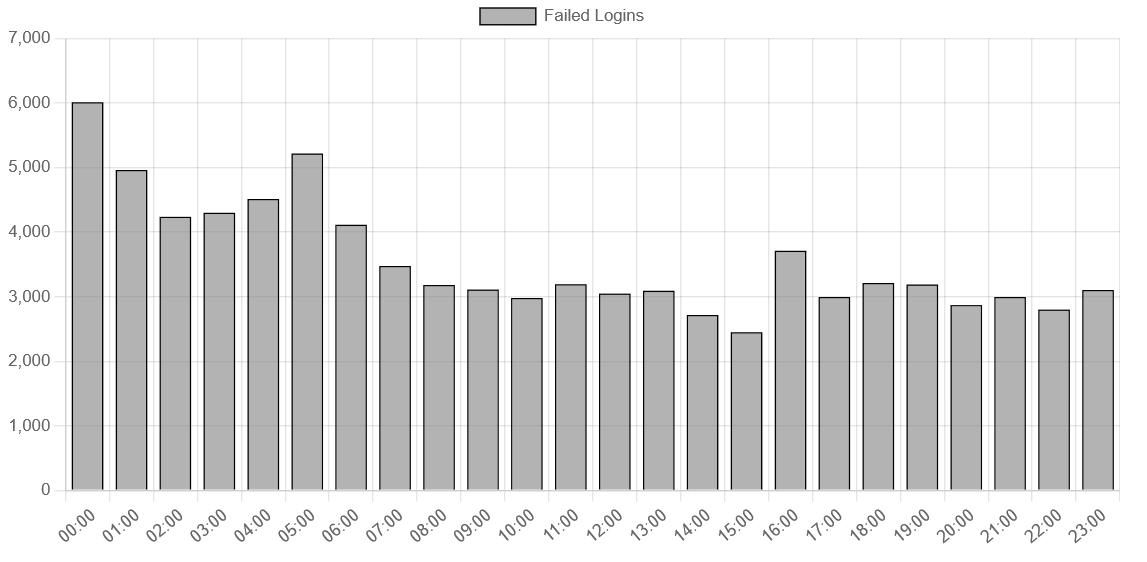
Looking at the hourly breakdown, attacks peak between midnight and 5 AM UTC, with around 4.000-6.000 failed logins per hour during those windows. Things calm down a bit in the afternoon (14:00-15:00 UTC sees the lowest activity at around 2.500 attempts). This probably reflects a mix of botnet activity running 24/7 and some geographic clustering of where these attacks originate. The bots don't sleep, even if their operators do.
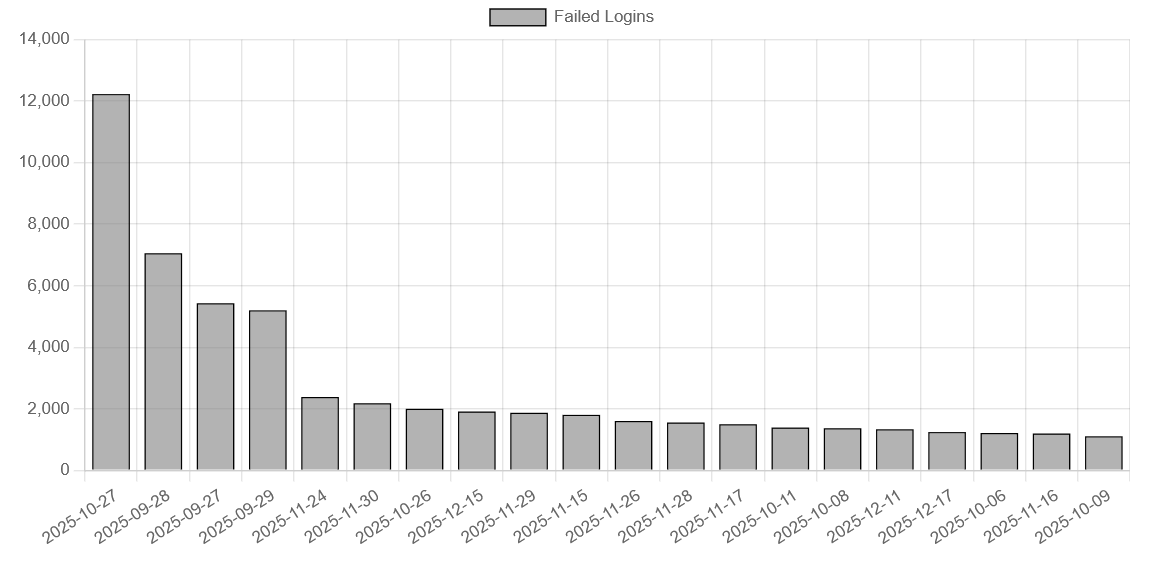
The spikiest day? October 27th saw over 12.000 failed login attempts alone. I checked and found nothing obvious, but clearly somebody really liked my servers on this day.
Usernames and Passwords
Ah, the credential stuffing. This is always my favorite part.
Top Usernames Tried
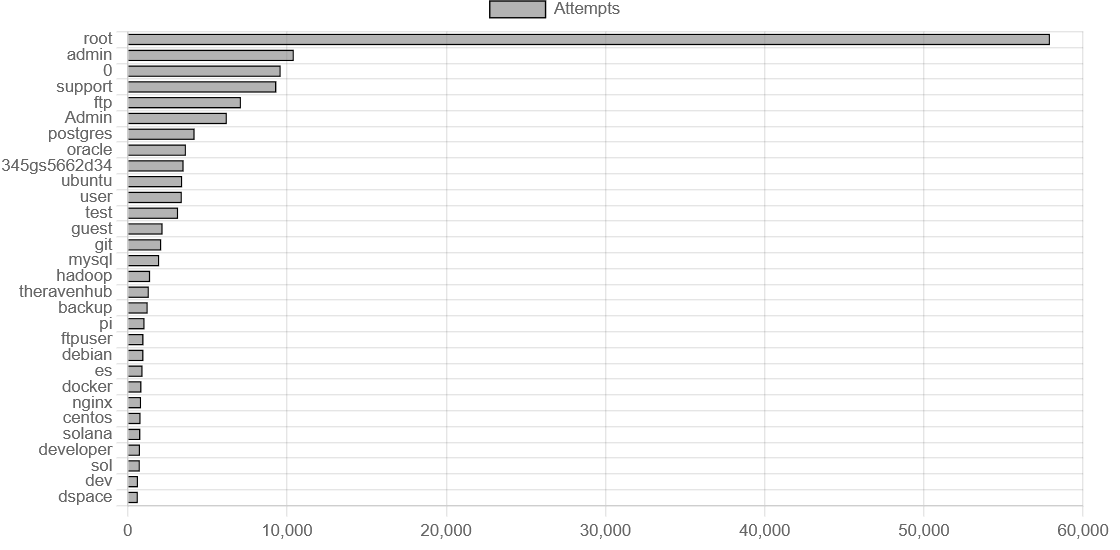
No surprises here. root dominates with over 57.000 attempts, more than the next five combined. The attackers are clearly hoping to hit the jackpot on poorly secured boxes with root login enabled (please disable this, by the way).
But there are some weird ones in the mix:
345gs5662d34- 3.500 attempts. Wild username to say the very least, quick research didn't really explain this eithertheravenhub- 1.300 attempts. Not so much weird, as somewhat suprised, that attackers seem to try the servers domain name as passwordssolanaandsol- Combined 1.500 attempts. Crypto node operators are clearly also being targeted
Top Passwords Tried
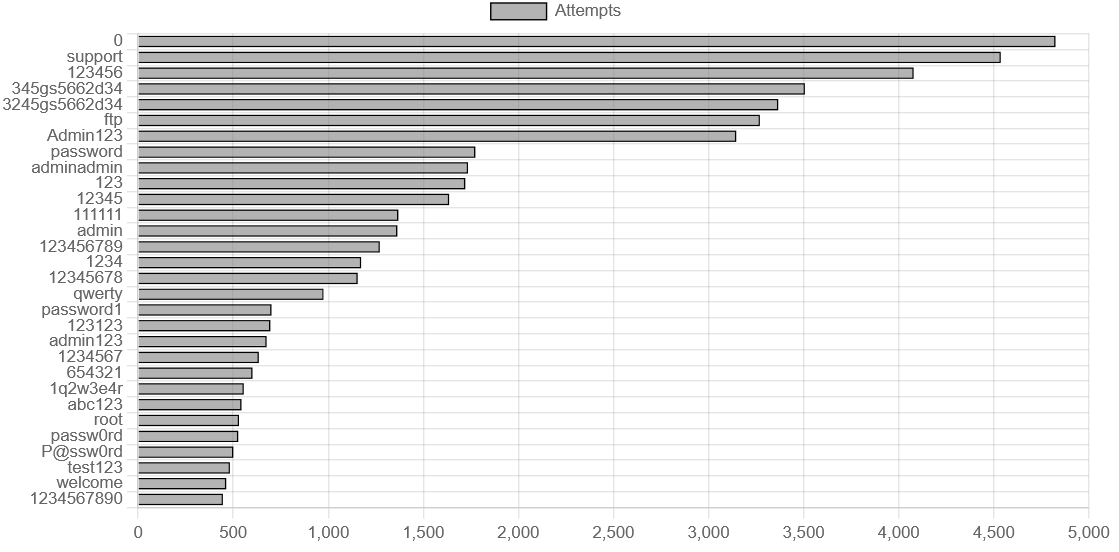
The classics never die. 123456 is still going strong in 2025. We also see password, admin123, qwerty, the whole 'please hack me' starter pack is here.
However, I was somewhat surprised by the massive number of attempts for the password supportwith over 4.500 attempts. Seems like attackers really think, that support access are that badly secured.
The Top Offenders
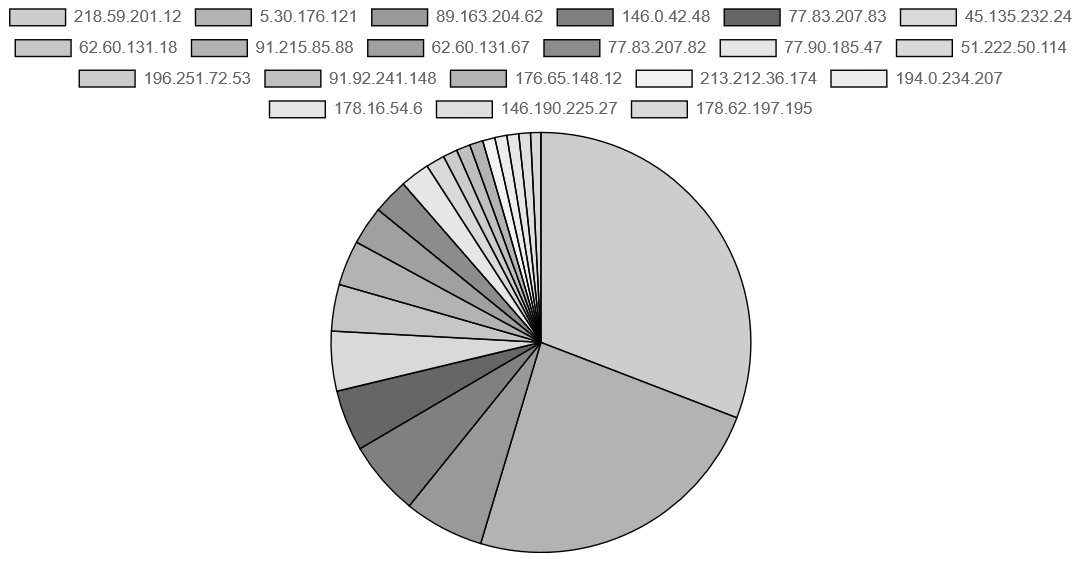 (Ps: Well aware, that the gray is not really helping this diagram here, the original version is however interactable)
Two IPs were incredibly persistent:
218.59.201.12- 16.156 connections (China Telecom, Shandong)5.30.176.121- 12.463 connections (somewhere in Dubai)
Between them, these two sources account for nearly 28% of all connections. They are either running very aggressive scanning operations or are part of a larger botnet infrastructure. Either way, they would be first on my blocklist if this were a production system.
What Did They Do Once Inside?
Here's where it gets interesting. Remember, a honeypot lets attackers "succeed" so we can watch what they try to do next.
The Reconnaissance Script
The most common command sequence (executed over 170.000 times with slight variations) was a system profiling script:
uname=$(uname -s -v -n -m)
arch=$(uname -m)
cpus=$(nproc)
gpu_info=$(lspci | grep -i vga)
# ... and so on
This is classic botnet behavior: enumerate the target to figure out what it's useful for. They're checking CPU count, GPU presence (for cryptomining potential), and system architecture. It's basically a "is this box worth compromising further?" assessment.
The SSH Key Backdoor
This one is nastier. About 4.000 sessions tried to execute:
cd ~ && rm -rf .ssh && mkdir .ssh && echo "ssh-rsa AAAAB3Nza... mdrfckr">>.ssh/authorized_keys
This wipes your existing SSH keys and plants the attacker's key, giving them persistent access even if you change the password. The key comment mdrfckr is... well, let's just say it's a known signature from a cryptomining botnet that's been around for years. Charming folks.
Used Tools
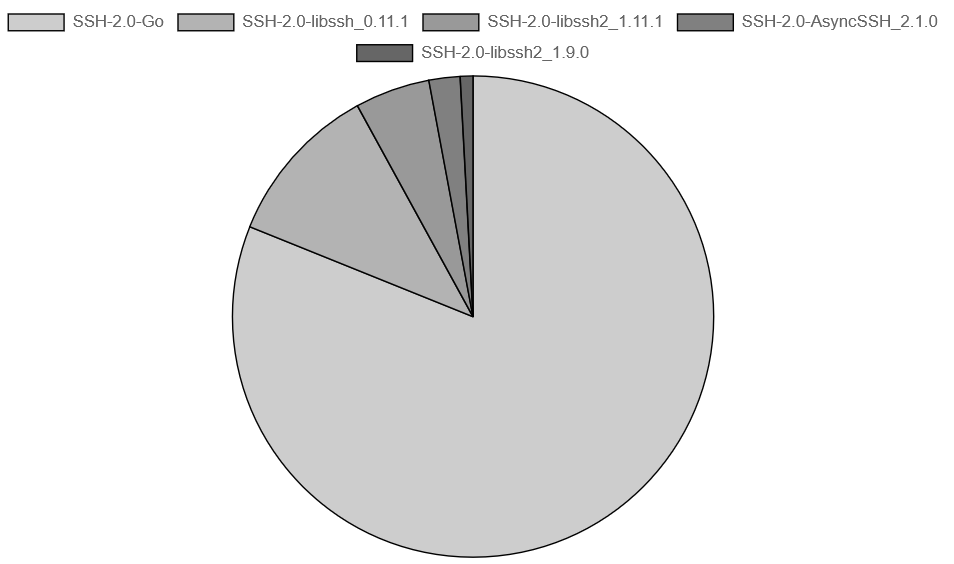
80% of connections used Go-based SSH clients. This isn't people manually typing ssh root@yourserver. These are automated tools and custom scanners, probably purpose-built for mass credential stuffing. The Go ecosystem has made it trivially easy to write fast, concurrent network tools, which is great for legitimate purposes and also great for attackers.
Takeaways
After watching three months of this chaos, here's the obvious (but worth repeating) advice:
- Disable password authentication entirely. Use SSH keys only. This stops most of these automated attacks cold.
- Disable root login. Even with key-only auth, there is no reason to allow direct root access.
- Use fail2ban or similar. After 3-5 failed attempts, block the IP for a few hours.
- Move SSH to a non-standard port. Security through obscurity isn't real security, but it does cut down on the noise dramatically. Most of the stupid scanners (which is a lot of this traffic) only hit common ssh ports such as 22 and 2222.
- Check your authorized_keys file periodically. If you see a key you don't recognize (especially one ending in "mdrfckr"), you've got problems.